
Frame Animation
Unbounded Cloud Video Editor supports keyframe animation, allowing users to achieve smooth transition effects for elements by setting keyframes.
Keyframe Animation Definition
Keyframe animation is an animation technique that sets property values at specific time points (keyframes) on the timeline, allowing the software to automatically calculate and generate intermediate transition effects. In video editing and animation production, keyframes are the core of controlling animation changes.
Keyframe Animation Principles
- Keyframe: A specific time point marked on the timeline, used to define the property state of an element at that time point (such as position, size, transparency, rotation angle, etc.)
- Interpolation Calculation: The software automatically calculates the transition effects between adjacent keyframes to generate smooth animations
- Timeline Control: By adjusting the position and property values of keyframes, the rhythm and effect of the animation can be precisely controlled
Keyframe Animation Creation and Editing
In Unbounded Cloud Video Editor, users can create and edit keyframe animations through the following steps:
- Select the element that needs to add animation
- Move the cursor to the time point where the keyframe needs to be added
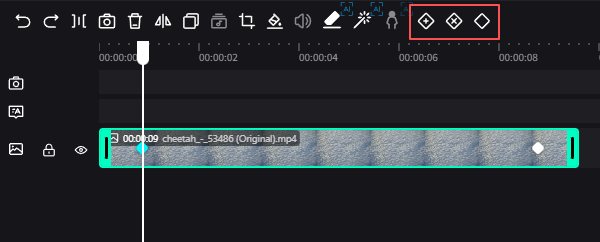
- Click the keyframe add button in the timeline tools
- Drag the timeline cursor to another time point, modify the property values of the element, and the system will automatically add the second keyframe
Keyframe Animation Application Scenarios
Keyframe animation is widely used in various video effects:
- Element movement, scaling, and rotation animations
- Fade in and fade out effects (transparency changes)
- Color gradient effects
- Complex path animations
- Mask animations (used with element masks)
Keyframe Tools
In the timeline toolbar, there are common operation tools for keyframes:
- Add keyframe
- Delete keyframe
- Copy keyframe
These tools can help users create and edit keyframe animations more efficiently.