
Interface
This document introduces the interface layout and functional areas of Unbounded Cloud Video Editor.
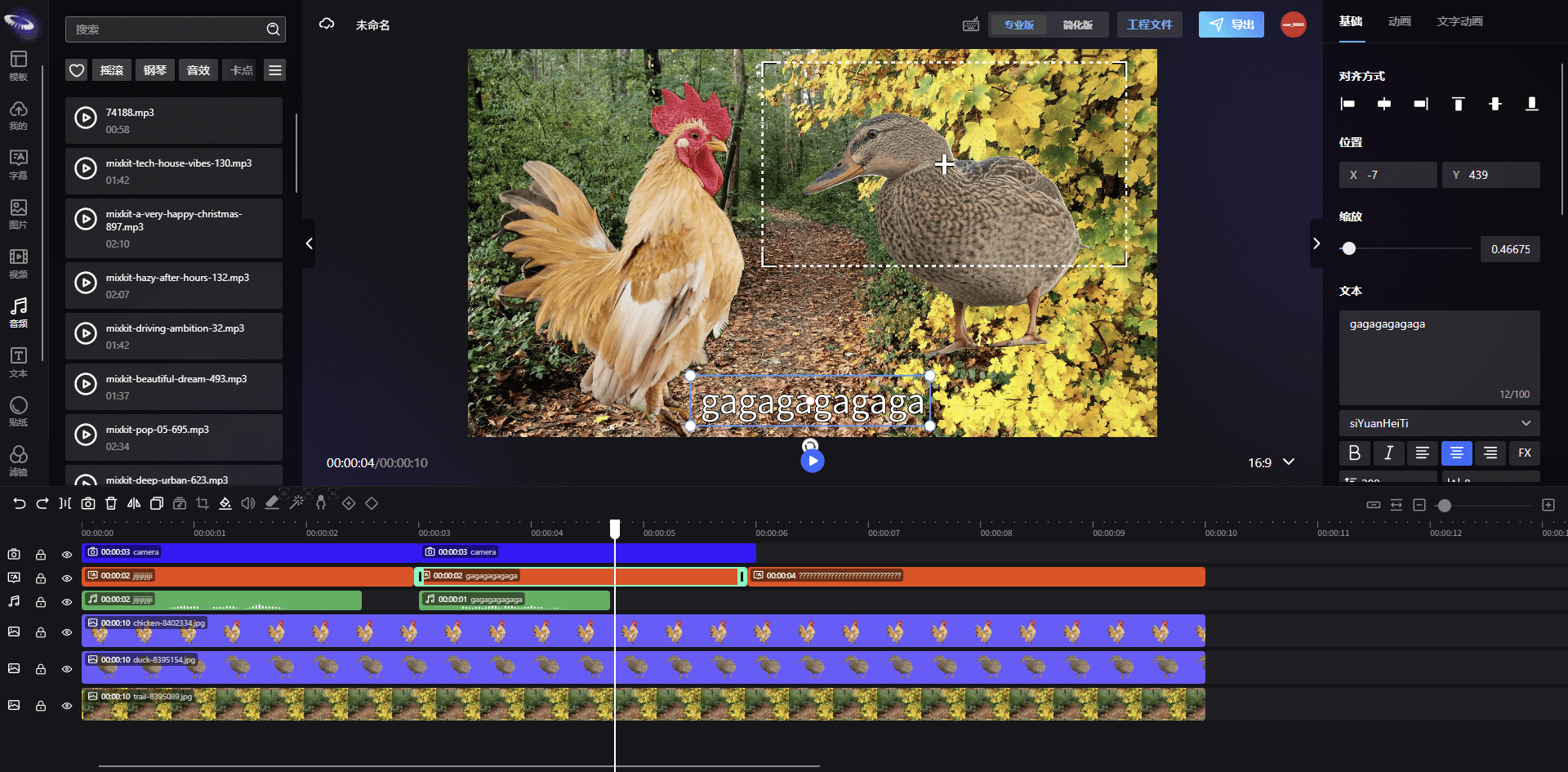
Left Area
The left area is the tool function navigation bar, which includes functional modules such as video editing, material management, template management, etc. Users can click on different navigation items to switch to the corresponding functional area.
Top Area
The top area is the tool operation bar, which contains common operations: project name setting, shortcut key help, editing mode switching, export, multi-language, skin changing, login/logout.
Middle Area
The middle area is the video editing area, which displays the currently loaded video file. Users can perform operations such as dragging, scaling, and rotating elements of the video in this area.
Right Area
The right area is the tool settings area, which contains the property settings of the currently selected element. Users can adjust the parameters of the selected element in this area, such as position, size, rotation angle, etc. The settings will also vary according to the type of selected element.
Bottom Area
The bottom area is the timeline area, which displays the video timeline. Users can perform operations such as video clipping and adding keyframes in this area.